pandasでcsv読みこみ datetime型の型指定で。
pandasでファイルの読み書きのテスト。datetimeの処理が必要なので、型指定の手順を確認。
読んでるファイル 'Book2.csv'
,time,x,y,z
0,2019-03-23 08:53:16,0.384126267,0.791150474,1
1,2019-03-23 08:53:16,0.121509436,0.161273729,3
2,2019-03-23 08:53:16,0.97859278,0.926904462,5
3,2019-03-23 08:53:16,0.824561636,0.455903221,7
4,2019-03-23 08:53:16,0.543611046,0.7457197440000001,9
5,2019-03-23 08:53:16,0.056624959,0.39308888200000003,0
6,2019-03-23 08:53:16,0.912447124,0.7451860359999999,-1
7,2019-03-23 08:53:16,0.354390345,0.881826662,-3
8,2019-03-23 08:53:16,0.7894431120000001,0.256685437,-5
9,2019-03-23 08:53:16,0.758507423,0.067165236,-7
10,2019-03-23 08:53:16,0.400961991,0.547244365,-9
プログラム
import pandas as pd

book2_dtypes = {'time':'str', 'x':'float', 'y':'str','z':'int'}
datetime_format= '%Y-%m-%d %H:%M:%S'
datetime_parser = lambda date: pd.datetime.strptime(date, datetime_format)

df1 = pd.read_csv('Book2.csv', index_col=0, dtype=book2_dtypes, parse_dates=[1], date_parser = datetime_parser)

print(df1["time"].dtype)
print(df1["x"].dtype)
print(df1["y"].dtype)
print(df1["z"].dtype)

print(df1)

df1.to_csv("Book3.csv",sep=",",encoding="utf_8")
実行結果
datetime64[ns]
float64
object
int32
                  time         x                    y  z
0  2019-03-23 08:53:16  0.384126          0.791150474  1
1  2019-03-23 08:53:16  0.121509          0.161273729  3
2  2019-03-23 08:53:16  0.978593          0.926904462  5
3  2019-03-23 08:53:16  0.824562          0.455903221  7
4  2019-03-23 08:53:16  0.543611   0.7457197440000001  9
5  2019-03-23 08:53:16  0.056625  0.39308888200000003  0
6  2019-03-23 08:53:16  0.912447   0.7451860359999999 -1
7  2019-03-23 08:53:16  0.354390          0.881826662 -3
8  2019-03-23 08:53:16  0.789443          0.256685437 -5
9  2019-03-23 08:53:16  0.758507          0.067165236 -7
10 2019-03-23 08:53:16  0.400962          0.547244365 -9
移動標準偏差
移動平均同様、numpyを使って、2次元のマトリックスに対する移動標準偏差の計算。
移動平均も内部で利用。
プログラム
import numpy as np

def moving_sum(data_2d,axis=1,windowsize=3):
    answer = np.zeros((data_2d.shape))
    answer[:,:] = np.nan

    v = np.ones(windowsize,)

    for i in range(data.shape[axis]):
        if axis==0:
            answer[i,windowsize-1:]=np.convolve(data_2d[i,:], v, mode = "valid")
        if axis==1:
            answer[windowsize-1:,i]=np.convolve(data_2d[:,i], v, mode = "valid")
        answer=answer
    return answer

def moving_average(data_2d,axis=1,windowsize=3):
    return moving_sum(data_2d,axis,windowsize)/windowsize

def moving_std(data_2d,axis=1,windowsize=3):
    answer = np.zeros((data_2d.shape))
    answer[:,:] = np.nan

    answer = moving_sum(np.square(data_2d),axis,windowsize) -\
        np.square(moving_average(data_2d,axis,windowsize))*windowsize
    answer = answer/(windowsize)
    answer = np.sqrt(answer)

    return answer

#4列のデータが8点
#data=np.arange(32)
#data=np.random.rand(32)
#data=data.reshape(8,4)

#検算のため即値で
data=np.array([[0.86619006, 0.9130783,  0.51988756, 0.35008161],
 [0.12355818, 0.3230697,  0.70366867, 0.74275339],
 [0.58942652, 0.74948935, 0.30359438, 0.55652164],
 [0.40820522, 0.85400935, 0.29218585, 0.21874757],
 [0.06330341, 0.91181499, 0.73940466, 0.88877802],
 [0.7945424,  0.67662696, 0.44624821, 0.65392414],
 [0.26358476, 0.43238069, 0.00853011, 0.05989708],
 [0.89179866, 0.52684014, 0.14116962, 0.6934826 ]])


print("元データ")
print(data)
print("横方向で平均")
answer = moving_average(data,axis=0,windowsize=3)
print(answer)
print("縦方向で平均")
answer = moving_average(data,axis=1,windowsize=3)
print(answer)
print("横方向で標準偏差")
answer=moving_std(data,axis=0,windowsize=3)
print(answer)
print("縦向で標準偏差")
answer=moving_std(data,axis=1,windowsize=3)
print(answer)
print("検算 縦向 右下の値 標準偏差")
print(data[5:8,3])
print(np.std(data[5:8,3]))
実行結果
元データ
[[0.86619006 0.9130783  0.51988756 0.35008161]
 [0.12355818 0.3230697  0.70366867 0.74275339]
 [0.58942652 0.74948935 0.30359438 0.55652164]
 [0.40820522 0.85400935 0.29218585 0.21874757]
 [0.06330341 0.91181499 0.73940466 0.88877802]
 [0.7945424  0.67662696 0.44624821 0.65392414]
 [0.26358476 0.43238069 0.00853011 0.05989708]
 [0.89179866 0.52684014 0.14116962 0.6934826 ]]
横方向で平均
[[       nan        nan 0.76638531 0.59434916]
 [       nan        nan 0.38343218 0.58983059]
 [       nan        nan 0.54750342 0.53653512]
 [       nan        nan 0.51813347 0.45498092]
 [       nan        nan 0.57150769 0.84666589]
 [       nan        nan 0.63913919 0.59226644]
 [       nan        nan 0.23483185 0.16693596]
 [       nan        nan 0.51993614 0.45383079]]
縦方向で平均
[[       nan        nan        nan        nan]
 [       nan        nan        nan        nan]
 [0.52639159 0.66187912 0.5090502  0.54978555]
 [0.37372997 0.64218947 0.43314963 0.50600753]
 [0.35364505 0.8384379  0.44506163 0.55468241]
 [0.42201701 0.81415043 0.49261291 0.58714991]
 [0.37381019 0.67360755 0.39806099 0.53419975]
 [0.64997527 0.5452826  0.19864931 0.46910127]]
横方向で標準偏差
[[       nan        nan 0.17534819 0.23579612]
 [       nan        nan 0.24064464 0.18930211]
 [       nan        nan 0.1844338  0.18258364]
 [       nan        nan 0.24217704 0.28374409]
 [       nan        nan 0.36618303 0.07642602]
 [       nan        nan 0.14464027 0.10366564]
 [       nan        nan 0.17422663 0.1888656 ]
 [       nan        nan 0.30648191 0.23131534]]
縦向で標準偏差
[[       nan        nan        nan        nan]
 [       nan        nan        nan        nan]
 [0.30643714 0.24870894 0.16350932 0.16037833]
 [0.1917459  0.22965072 0.19134254 0.21688596]
 [0.21822617 0.06717765 0.20818406 0.27354188]
 [0.29868678 0.10006632 0.1854965  0.27758398]
 [0.30853401 0.19573988 0.30031751 0.34881834]
 [0.27608926 0.10056226 0.1832616  0.28980139]]
検算 縦向 右下の値 標準偏差
[0.65392414 0.05989708 0.6934826 ]
0.28980139385514914
移動平均(numpy.convolve利用)
移動平均の関数のテスト。
numpy.convolveは、以下が想定とちょっと違ったので。
- 平均の範囲
- 戻ってくる大きさ

想定
- 入力と出力が同じ大きさの配列
- 2次元配列を処理してほしい
- データがないところはNAN
プログラム
入力と同じ大きさのnanを用意しておく。
numpy.convolveは、mode=validで計算して、値があるところだけ値を書き込み。
import numpy as np

def movingaverage(data_2d,axis=1,windowsize=3):
    answer = np.zeros((data_2d.shape))
    answer[:,:] = np.nan

    v = np.ones(windowsize,)/windowsize

    for i in range(data.shape[axis]):
        if axis==0:
            answer[i,windowsize-1:]=np.convolve(data_2d[i,:], v, mode = "valid")
        if axis==1:
            answer[windowsize-1:,i]=np.convolve(data_2d[:,i], v, mode = "valid")
        answer=answer
    return answer

#4列のデータが8点
data=np.arange(32)
data=data.reshape(8,4)
print("元データ")
print(data)
print("横方向で平均")
answer = movingaverage(data,axis=0,windowsize=3)#横方向で平均
print(answer)
print("縦方向で平均")
answer = movingaverage(data,axis=1,windowsize=3)#縦方向で平均
print(answer)
実行結果
元データ
[[ 0  1  2  3]
 [ 4  5  6  7]
 [ 8  9 10 11]
 [12 13 14 15]
 [16 17 18 19]
 [20 21 22 23]
 [24 25 26 27]
 [28 29 30 31]]
横方向で平均
[[nan nan  1.  2.]
 [nan nan  5.  6.]
 [nan nan  9. 10.]
 [nan nan 13. 14.]
 [nan nan 17. 18.]
 [nan nan 21. 22.]
 [nan nan 25. 26.]
 [nan nan 29. 30.]]
縦方向で平均
[[nan nan nan nan]
 [nan nan nan nan]
 [ 4.  5.  6.  7.]
 [ 8.  9. 10. 11.]
 [12. 13. 14. 15.]
 [16. 17. 18. 19.]
 [20. 21. 22. 23.]
 [24. 25. 26. 27.]]
より大きな値の数や割合
こんな感じ。要素数で割れば、割合がわかる。
for文を回さなくていいので、numpy便利。
>>> import numpy as np
>>>
>>> a=np.array([71,77,80,80,89,83])
>>> b=np.sum(a>=80)
>>> print(b)
4
実際のところTrueを1として計算してくれている。
>>> c=a>=80
>>> c
array([False, False,  True,  True,  True,  True])
>>> c.astype(int)
array([0, 0, 1, 1, 1, 1])
移動分散のサンプルプログラム
移動分散のサンプルプログラム
プログラム
import numpy as np
a=np.array([71,77,80,80,89,83])

windowsize=3

for i in range(a.shape[0]-windowsize):
    print("print a[{0}:{1}]".format(i,i+windowsize))
    np.std(a[i:i+windowsize])
実行結果
print a[0:3]
3.7416573867739413
print a[1:4]
1.4142135623730951
print a[2:5]
4.242640687119285
ujsonのインストールができない
解決方法
- https://visualstudio.microsoft.com/downloads/から、下のほうにある、Build Tools for Visual Studio 2017 をダウンロード。
- 実行して、以下を選択してインストール
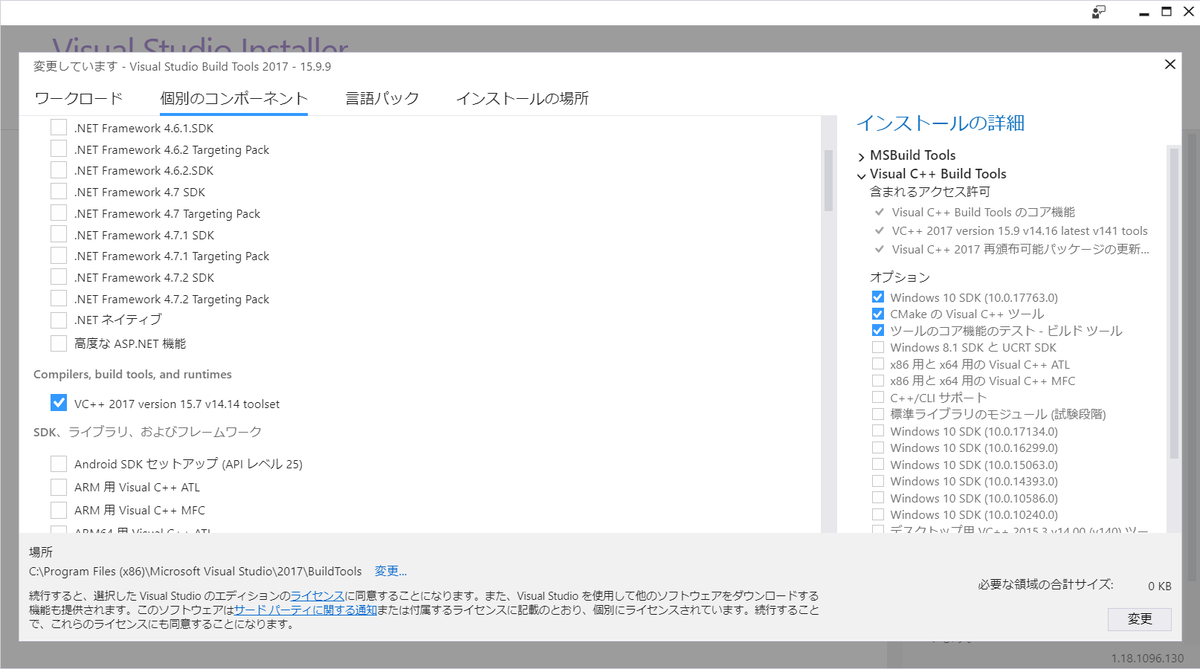
留意事項
試行錯誤中に、Visul Studio 2015のbulid toolsも入れた(それだけではエラーは変わらず)。上記解決方法で解決しない場合はインストールする。
https://www.microsoft.com/ja-JP/download/details.aspx?id=48159
エラー内容
pip install ujsonの時のエラーの内容は以下。
(base) C:\WINDOWS\system32>pip install ujson
Collecting ujson
  Using cached https://files.pythonhosted.org/packages/16/c4/79f3409bc710559015464e5f49b9879430d8f87498ecdc335899732e5377/ujson-1.35.tar.gz
Building wheels for collected packages: ujson
  Building wheel for ujson (setup.py) ... error
  Complete output from command C:\ProgramData\Anaconda3\python.exe -u -c "import setuptools, tokenize;__file__='C:\\Users\\<username>\\AppData\\Local\\Temp\\pip-install-hvxfwwjm\\ujson\\setup.py';f=getattr(tokenize, 'open', open)(__file__);code=f.read().replace('\r\n', '\n');f.close();exec(compile(code, __file__, 'exec'))" bdist_wheel -d C:\Users\dial8\AppData\Local\Temp\pip-wheel-7j8d0yrz --python-tag cp37:
  Warning: 'classifiers' should be a list, got type 'filter'
  running bdist_wheel
  running build
  running build_ext
  building 'ujson' extension
  error: Microsoft Visual C++ 14.0 is required. Get it with "Microsoft Visual C++ Build Tools": https://visualstudio.microsoft.com/downloads/

  ----------------------------------------
  Failed building wheel for ujson
  Running setup.py clean for ujson
Failed to build ujson
Installing collected packages: ujson
  Running setup.py install for ujson ... error
    Complete output from command C:\ProgramData\Anaconda3\python.exe -u -c "import setuptools, tokenize;__file__='C:\\Users\\<username>\\AppData\\Local\\Temp\\pip-install-hvxfwwjm\\ujson\\setup.py';f=getattr(tokenize, 'open', open)(__file__);code=f.read().replace('\r\n', '\n');f.close();exec(compile(code, __file__, 'exec'))" install --record C:\Users\dial8\AppData\Local\Temp\pip-record-48ijrvtr\install-record.txt --single-version-externally-managed --compile:
    Warning: 'classifiers' should be a list, got type 'filter'
    running install
    running build
    running build_ext
    building 'ujson' extension
    error: Microsoft Visual C++ 14.0 is required. Get it with "Microsoft Visual C++ Build Tools": https://visualstudio.microsoft.com/downloads/

    ----------------------------------------
Command "C:\ProgramData\Anaconda3\python.exe -u -c "import setuptools, tokenize;__file__='C:\\Users\\<username>\\AppData\\Local\\Temp\\pip-install-hvxfwwjm\\ujson\\setup.py';f=getattr(tokenize, 'open', open)(__file__);code=f.read().replace('\r\n', '\n');f.close();exec(compile(code, __file__, 'exec'))" install --record C:\Users\dial8\AppData\Local\Temp\pip-record-48ijrvtr\install-record.txt --single-version-externally-managed --compile" failed with error code 1 in C:\Users\dial8\AppData\Local\Temp\pip-install-hvxfwwjm\ujson\

(base) C:\WINDOWS\system32>
